There are two ways an aurora app can tell you something is happening. It can watch an index and notify you when the index goes up, or it can watch what is going to make the index go up and notify you before it does. The first is a report. The second is a warning, and it is the only one worth waking up for.
The difference is not marketing. It comes from where the measurement is taken.
The head start is a physical distance
Two spacecraft, DSCOVR and ACE, sit at a point called L1, roughly 1.5 million kilometres sunward of Earth. They are not forecasting anything. They are sitting in the solar wind as it goes past, measuring its speed and the direction of the magnetic field it carries.
Whatever passes them will pass Earth. The only question is when, and that is division: 1.5 million kilometres divided by the wind speed. A slow stream at 350 km/s takes about seventy minutes. A fast one at 700 km/s takes about thirty-five. The estimate carries maybe ten minutes of slop, because the wind is not perfectly uniform and the spacecraft is not exactly on the Earth-Sun line.
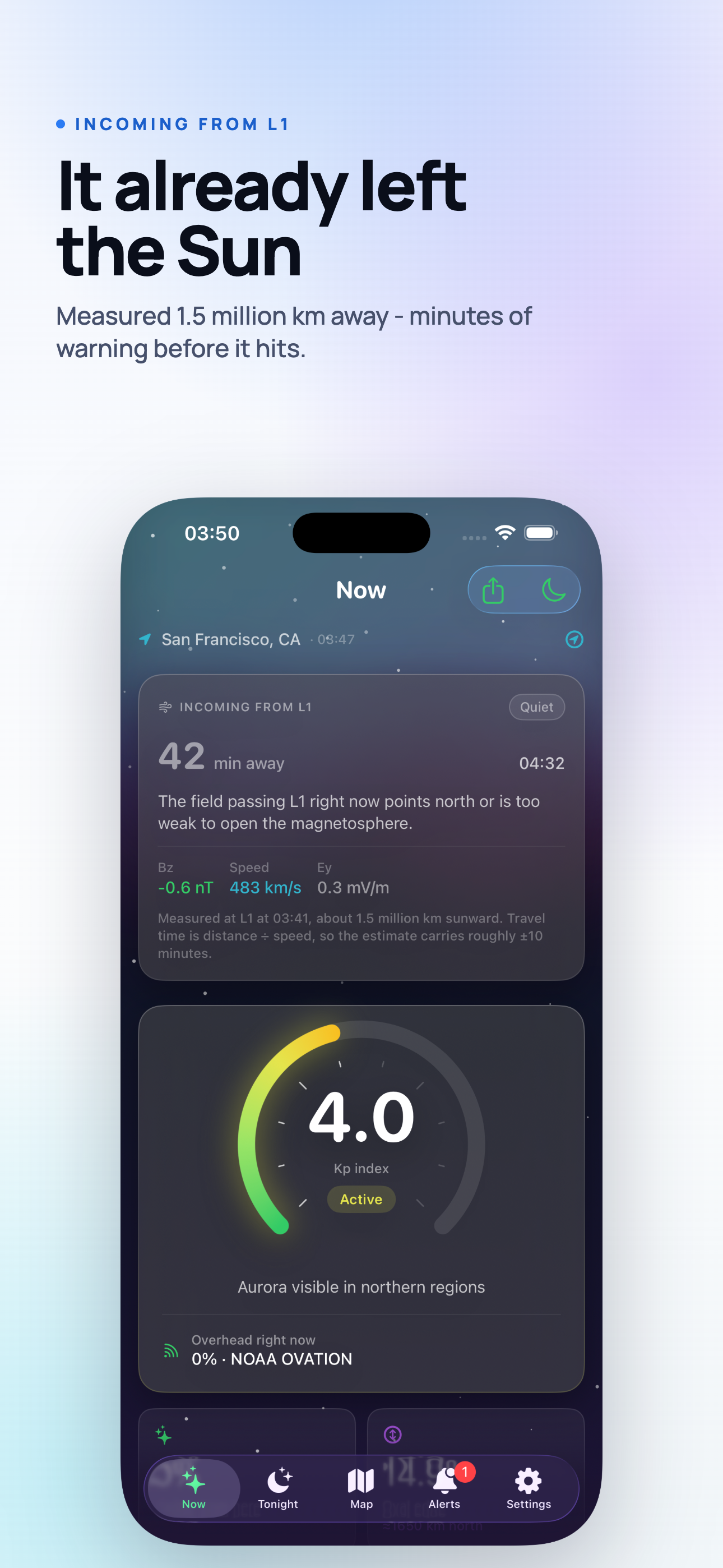
So the lead time is real, but it is not a forecast in the usual sense. Nothing is being predicted about the Sun. Something that already happened is in transit, and you are being told how long it has left to travel.
Speed alone does not do it
A fast stream that arrives with its magnetic field pointing north does very little. Earth's own field points north at the boundary, the two are parallel, and the wind slides past.
The number that decides this is Bz - the north-south component of the field the wind is carrying. Negative means southward, which is antiparallel to Earth's field, and antiparallel fields reconnect. Reconnection is what lets particles in. This is why a Kp 4 night with Bz sitting at -10 nT can beat a Kp 6 night with Bz at +5.
An alert that only watches speed will wake you for streams that do nothing. An alert that watches speed and Bz together will wake you less often, which is the point.
The threshold is a latitude question, not a preference
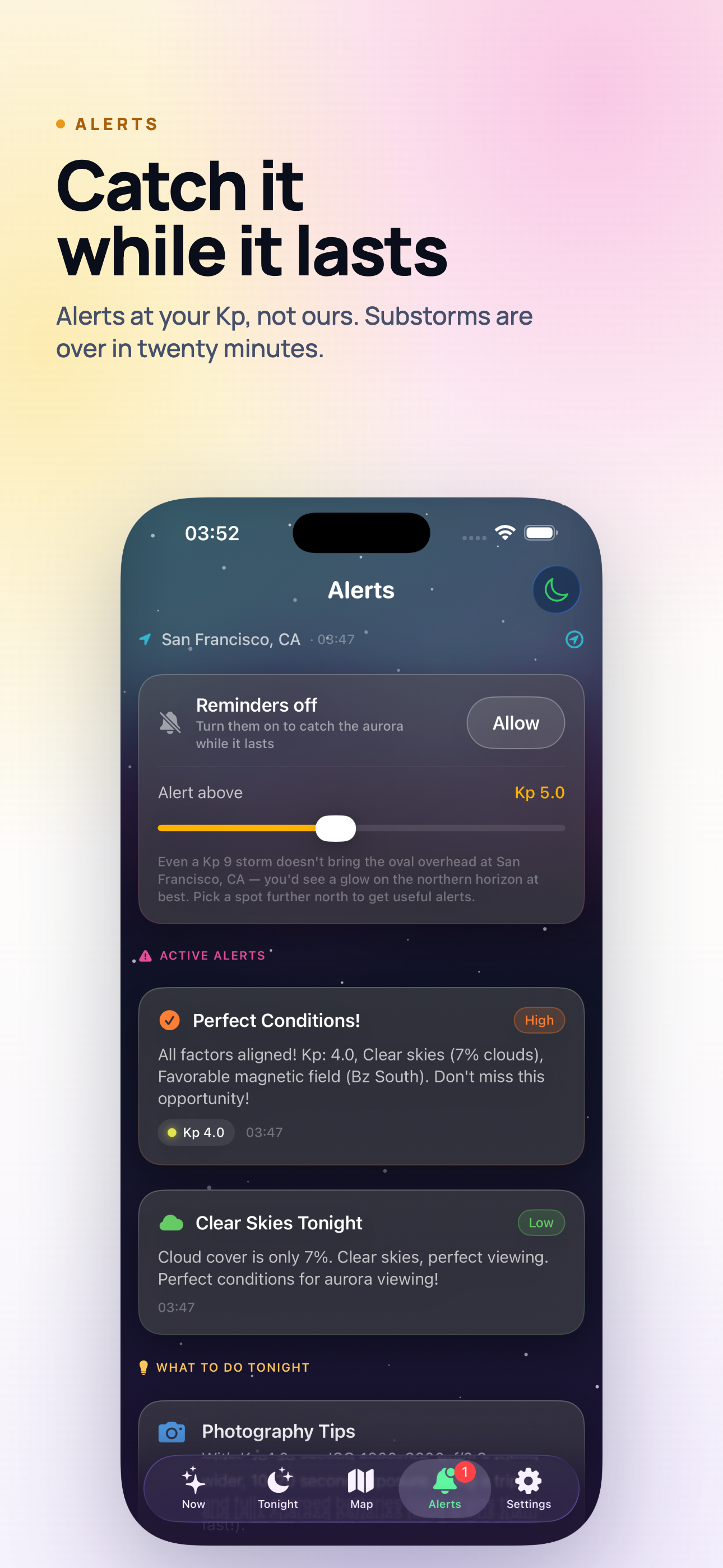
Every aurora app asks you to pick a Kp threshold, and almost none of them tell you what to pick. The honest answer is that it depends entirely on where you are standing, and not on the latitude printed on a map.
What matters is geomagnetic latitude, which is measured from the magnetic pole rather than the geographic one, and the two are more than a thousand kilometres apart. This is why the aurora reaches Minneapolis at a Kp that leaves Moscow, at the same geographic latitude, with nothing to look at.
Rough starting points, for the naked eye, in a clear dark sky:
- Tromso, Fairbanks, Yellowknife: Kp 2. Below that you are watching a quiet arc, if anything.
- Reykjavik, Anchorage: Kp 3.
- Inverness, Trondheim: Kp 4.
- Edinburgh, Oslo, Stockholm: Kp 5.
- Manchester, Hamburg, Warsaw: Kp 6.
- London, Amsterdam, Berlin: Kp 7, and you will be photographing it more than seeing it.
Set the threshold one step below the number for your location if you are willing to be disappointed occasionally, and one step above if you would rather only be woken for something exceptional. A camera on a tripod sees roughly a level earlier than your eyes do, so photographers should sit lower than this table suggests.
The second alert nobody thinks to ask for
A geomagnetic alert tells you the sky is active. It does not tell you whether you can see the sky. Those are separate problems and most nights the second one is the one that ruins the evening.
The alert worth having alongside the Kp one fires when the cloud is about to break - when the hourly forecast says a gap is opening over you in the next half hour. On a marginal night that is more actionable than the geomagnetic number, because activity that lasts an hour and a gap that lasts twenty minutes only overlap if you are already outside when the gap arrives.
If you only keep one notification enabled, keep this one. Quiet skies are common; clear skies during activity are the rare event.
Substorms, and why twenty minutes matters
The aurora does not build slowly and fade slowly. It goes in substorms: a quiet arc sits on the horizon for an hour, then brightens, breaks up, fills the sky, and is largely over inside twenty to thirty minutes.
This is the practical reason lead time is worth anything at all. Twenty minutes of warning is the difference between watching a substorm and reading about one. It is also the reason not to pack up the moment the sky goes quiet - substorms come in waves, and the second is often better than the first.
What to put on the Lock Screen
Notifications are for the exceptional case. For the ordinary case - the ten times a night you glance at your phone anyway - a widget does the job without asking anything of you.
The three things worth having on a Home Screen or Lock Screen widget:
- Current Kp, because it is the headline number even if it is not the whole answer.
- Your chance from here, which is the Kp turned into something location-specific, so you are not doing the latitude arithmetic in your head at 23:00.
- Tonight's clearest window, because it is the number that decides what time you leave the house.
And once you are out: a Live Activity keeps Kp and cloud cover on the Lock Screen and in the Dynamic Island, which matters more than it sounds when your hands are cold and unlocking a phone means taking a glove off.
Notifications you should turn off
Aurora apps have a habit of notifying you about things that are not decisions. A daily summary at 09:00 is not a decision. A "moderate activity possible" push at a Kp two levels below your latitude is not a decision. Every one of those trains you to swipe the next one away without reading it, and eventually you swipe away the one that mattered.
The test for keeping a notification: if it arrives, will it ever change what you do in the next hour? If not, it is noise wearing a bell.
What this looks like in practice
A working setup on an iPhone, in the order you would set it up:
- Allow location, so the chance and the oval distance are computed where you actually are rather than for the nearest big city.
- Set the Kp threshold from the table above, then adjust it after a week of real nights.
- Leave the cloud-opening alert on. It is the one that turns a maybe into a yes.
- Put a widget on the Lock Screen so the passive check costs nothing.
- Turn everything else off.
Aurora Forecast does all five on iPhone and iPad, and the same one-time unlock carries to Apple TV if you want the forecast on a screen you walk past. It will also tell you plainly when a data source has gone quiet, rather than showing a confident number it does not have - which matters when the number is the reason you are about to drive an hour into the dark.